AI image detection works by checking for signed provenance data, invisible watermarks, or pixel patterns that a trained classifier links to AI generators. Combining those checks gives you stronger evidence than relying on a score alone.
I tested 12 images using Content Credentials and three free detectors, although usage caps stopped some checks. My set included OpenAI-generated originals, smaller JPEG copies, and real camera photos. The same bakery image scored 99% AI on one detector and almost certainly real on another.
This guide explains what each detection method catches, where it fails, and how to check an image yourself for free.
AI Image Detection: Key Takeaways 🔍
- Content Credentials identified my AI originals in seconds, but one JPEG re-save wiped their signed labels.
- Classifier detectors disagreed wildly: the same image scored 99%, 17.7%, and 1%.
- Invisible watermarks such as Google’s SynthID only identify signals from companies that add them.
- No single check settles every case, so combine provenance, detector results, and a close look.
Read about the recent changes I’ve made to this page ⬇️
I’ve rewritten this guide in October 2026 around my own hands-on image test, adding the latest on OpenAI’s Content Credentials and Google’s SynthID checks. I’ve also clarified what each method can and can’t tell you, including why a missing label cannot establish that a photo is real.
Quick Overview of AI Image Detection Methods
Start AI image detection with signed provenance when you have the original file. The five methods below examine different evidence, so a missing label and a low detector score don’t mean the same thing.
AI Image Detection Overview
- Content Credentials (C2PA): Reads a signed record identifying the image’s origin and recorded edits.
- Invisible watermarks: Looks for a hidden signal embedded in the pixels, such as Google SynthID.
- Classifier detectors: Uses a model trained on real and generated images to estimate whether an image is AI-generated.
- Forensic checks: Examines file metadata or pixel-level evidence of camera origin and editing.
- Your own eyes: Looks for inconsistencies in small text and other details.
Choose your starting point based on the file you have and the consequences of getting the answer wrong.
Use a Content Credentials check if:
You have the original download from a generator or a camera file. A valid signed record can identify its source directly, without asking a classifier to guess from its appearance.
Use a classifier detector if:
The image has been shared, screenshotted, or re-saved, so its original label may have disappeared. A classifier can still assess the pixels, although its percentage needs corroboration.
Use your own eyes if:
You’re on your phone and want a quick first impression, or the detectors disagree. Look closely at background details before deciding whether the image needs further investigation.
Start with Content Credentials, then run two different detectors, then zoom into small text. In my test, provenance identified the originals conclusively but disappeared from the re-saved copies; classifiers then gave conflicting answers about the same files.
For a casual check, that routine provides useful clues. If the result could damage someone’s reputation, check the original source before making any accusation.
How Does Content Credentials (C2PA) Detection Work?
- 🔎 What it checks: A cryptographically signed manifest recording an image’s origin and editing history
- 💻 Tools I used: verify.contentauthenticity.org; another option is c2paviewer.com
- ✅ Free to use: Yes
Content Credentials identified my original AI images in seconds, before any classifier assessed their pixels. A participating generator or camera signs a record describing an image’s origin, giving you evidence beyond its visual appearance.
C2PA is the open standard behind that record, called a manifest. It can contain the creation tool and recorded editing history, while cryptographic verification checks whether the signed information and associated image remain intact. Changing protected content without updating its credentials breaks validation.
A valid signature establishes who signed a claim; it doesn’t independently prove everything pictured actually happened. A camera can photograph a staged scene while still producing a genuine camera-origin record.
OpenAI attaches Content Credentials to its generated images, and Adobe supports the standard. Google’s Pixel 10 camera reached C2PA Assurance Level 2, while LinkedIn displays a Content Credentials icon on signed content.
In my test, every original AI PNG displayed “Issued by OpenAI OpCo, LLC” and “This image was generated with an AI tool.” The recorded actions included “Created” and “Format converted.” The check clearly identified the originals as AI-generated.
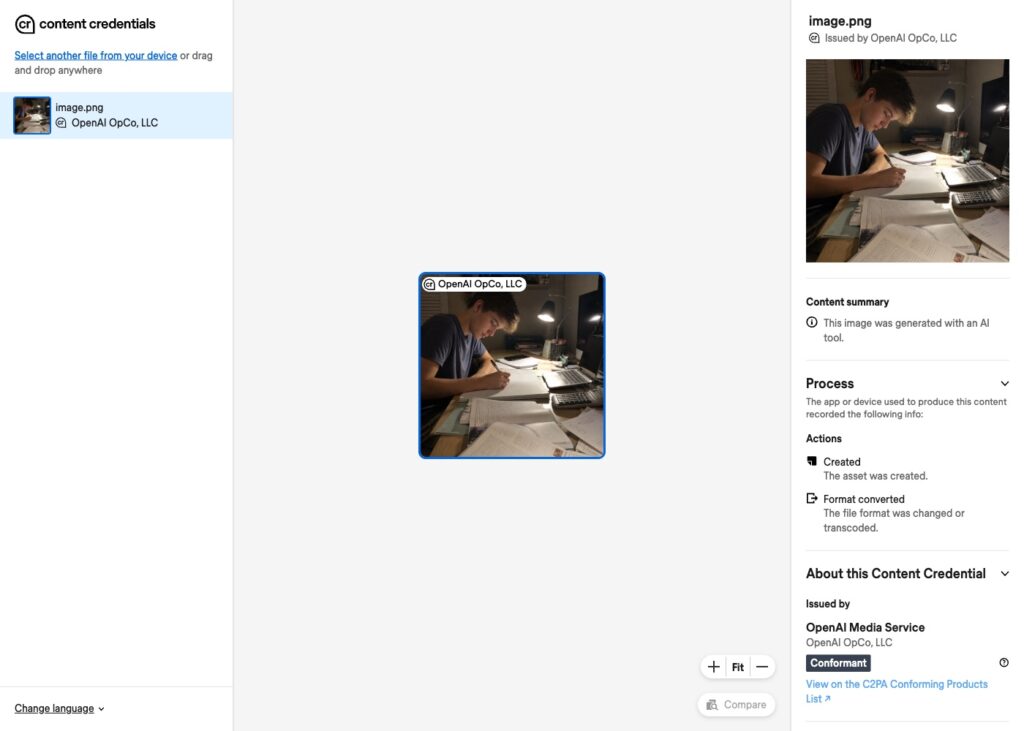
Content Credentials named OpenAI as the issuer of my AI student-desk image within seconds of uploading it. Source: AI-Tutor.ai
Then I re-saved the images as smaller JPEGs. All four copies lost their credentials, leaving the checker with nothing to inspect.
“No credentials” told me nothing about whether an image was real. My real camera photos had no Content Credentials either, because their cameras predated support for the standard. Their ordinary camera metadata survived, but that is a different kind of evidence.
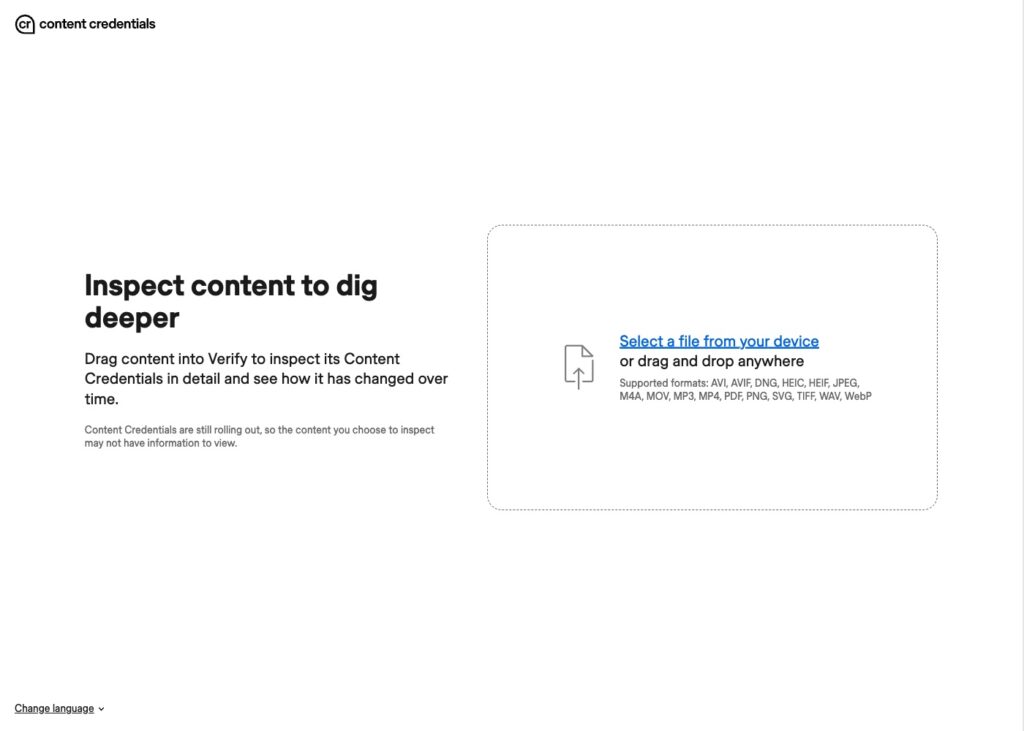
The same image after one JPEG re-save: the credentials were gone and the checker had nothing to show me. Source: AI-Tutor.ai
Screenshots also discard the original file’s manifest, and social platforms can strip it when processing uploads. Credential-aware editing tools can preserve or extend provenance, so losing it is possible rather than inevitable.
The signing system also has to be trustworthy. Nikon revoked its Z6 III certificates in September 2025 after a flaw allowed fraudulent signing. Google itself describes C2PA as “not the sole solution.”
If a trusted, valid label identifies AI generation, take that evidence seriously. If no label appears, move to the next method.
How Do Invisible Watermarks Like SynthID Work?
- 🔎 What it checks: A hidden signal embedded in an image’s pixels
- 💻 Our recommendation: Gemini: ask “Was this image created or edited by Google AI?” Or use SynthID Detector
- ✅ Free to use: Yes, about 10 image checks per rolling 24 hours in Gemini
An invisible watermark lives in the pixels, so it can survive a re-save that removes Content Credentials. Google’s SynthID uses a trained encoder to add subtle changes and a decoder to recognize the resulting signal.
Google DeepMind’s SynthID-Image paper describes deployment across over ten billion images and video frames. Google says the watermark usually survives ordinary compression and resizing, although repeated alterations can defeat detection.
OpenAI said in May 2026 that it would add SynthID alongside C2PA. I didn’t run SynthID checks in this test, so my results establish nothing about whether my OpenAI images carried that watermark.
A positive result indicates that a supported provider made or edited all or part of the image. No watermark found cannot clear an image: another generator may have made it, or processing may have weakened the signal.
Watermarks also face deliberate attacks. University of Waterloo researcher Andre Kassis reported that UnMarker removed SynthID from 79% of tested images, a finding Google DeepMind disputes.
False positives are another concern. Full Fact documented five politician-shared images flagged as Google-AI content despite posters saying they were unedited. Following Google’s October 2026 update, those results changed to “Unsure.”
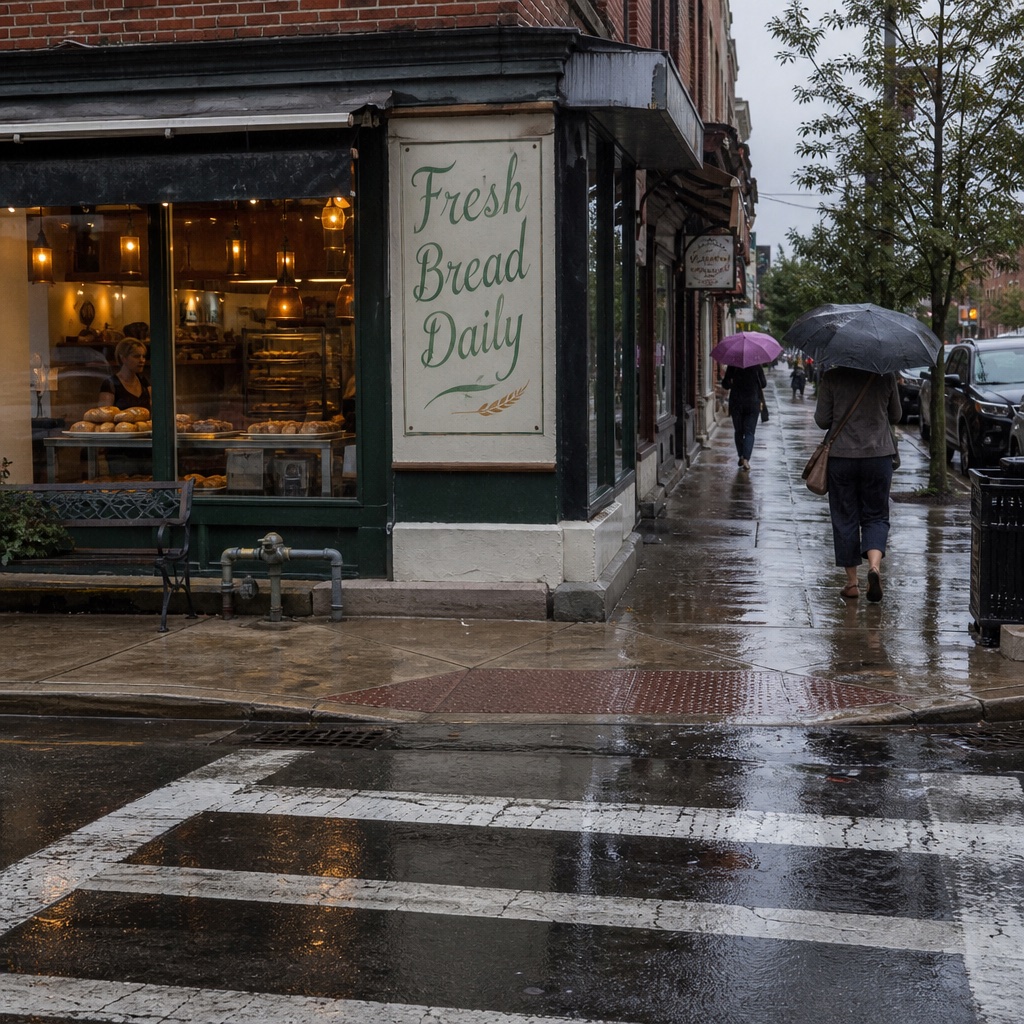
I generated this bakery scene with OpenAI’s image model; its Content Credentials disappeared after one JPEG re-save, which is the gap pixel watermarks are meant to fill. Source: AI-Tutor.ai
Should you check Content Credentials or SynthID first?
Check Content Credentials first when you have the original file, because a valid signed record can name the creation tool. Try SynthID when the image has been re-shared or screenshotted, since the signal lives in the pixels; Google recommends tightly cropping screenshots. Neither method can establish authenticity from an absent signal, and both depend on participating providers.
How Do AI Image Detector Tools Work?
- 🔎 What it checks: Pixel patterns learned from labeled real and generated images
- 💻 Tools I used: Sightengine, Illuminarty, and Decopy, using their free versions while logged out
- ✅ Free to use: Yes, but two tools stopped me after 5 to 8 scans
A classifier detector is itself an AI model, trained to recognize statistical patterns associated with generated images. It works much like AI text detection, and its output is a confidence or probability-style score. That percentage isn’t a guaranteed real-world chance that the image is fake.
Wang and colleagues trained an early detector on ProGAN images and found it could recognize outputs from other generators of that era. Frank and colleagues linked detectable frequency patterns to GAN upsampling, the process used to build larger images from smaller representations.
Diffusion models leave different traces, as Corvi and colleagues documented. Ojha, Li, and Lee explain a resulting failure: unfamiliar fakes can fall into a “real” catch-all category. A detector’s usefulness depends heavily on how well its learned patterns transfer to unfamiliar generators.
Newer approaches, including UnivFD and AIDE, use features from pretrained vision models to improve that transfer. Yet the Chameleon benchmark found nine off-the-shelf detectors labeled nearly all its challenging AI images as real.
Training shortcuts can also inflate apparent AI image detection accuracy. Fraunhofer’s “Fake or JPEG?” paper found that detectors partly learned file-format and size differences between training examples, rather than dependable generation traces.
My test used 12 images, with AI examples from one generator: a small sample, not a benchmark. I compared original OpenAI PNGs with JPEG copies re-saved at quality 70 and an 800-pixel long edge, alongside real camera photos.
| Image | Sightengine | Illuminarty | Decopy |
|---|---|---|---|
| AI student desk | 99% AI | 80.8% | 1% (Likely Real) |
| AI classroom | 99% AI | 90.5% | 99% (Likely AI) |
| AI dog park | 99% AI | 19.5% | 40% (Likely Real) |
| AI bakery street sign | 99% AI | 17.7% | 1% (Likely Real) |
| Re-saved AI student desk | 99% AI | 81% | Free limit hit |
| Re-saved AI classroom | 99% AI | 90.2% | Free limit hit |
| Re-saved AI dog park | 99% AI | 20.8% | Free limit hit |
| Re-saved AI bakery | Free limit hit | 17.2% | Free limit hit |
| Real classroom | Free limit hit | 35.7% | 1% (Likely Real) |
| Real dog with frisbee | Free limit hit | 7.7% | Free limit hit |
| Real student desk | Free limit hit | 12.3% | Free limit hit |
| Real rainy street | Free limit hit | 31.3% | Free limit hit |
Sightengine flagged every AI image it scored, including the compressed copies. Its generator attribution was less dependable: GPT ranked first in only four of seven results. I reached the free cap before it scored any real photos, so I couldn’t assess false positives.
Illuminarty placed half the AI originals above the midpoint, with scores barely changing after compression. The real classroom photo scored higher than two AI originals. None of my real photos exceeded 50%.
Decopy identified only one of four AI originals. Its written explanations sounded confident even when its verdict was wrong. An explanation of apparently natural details cannot substitute for an accurate classification.
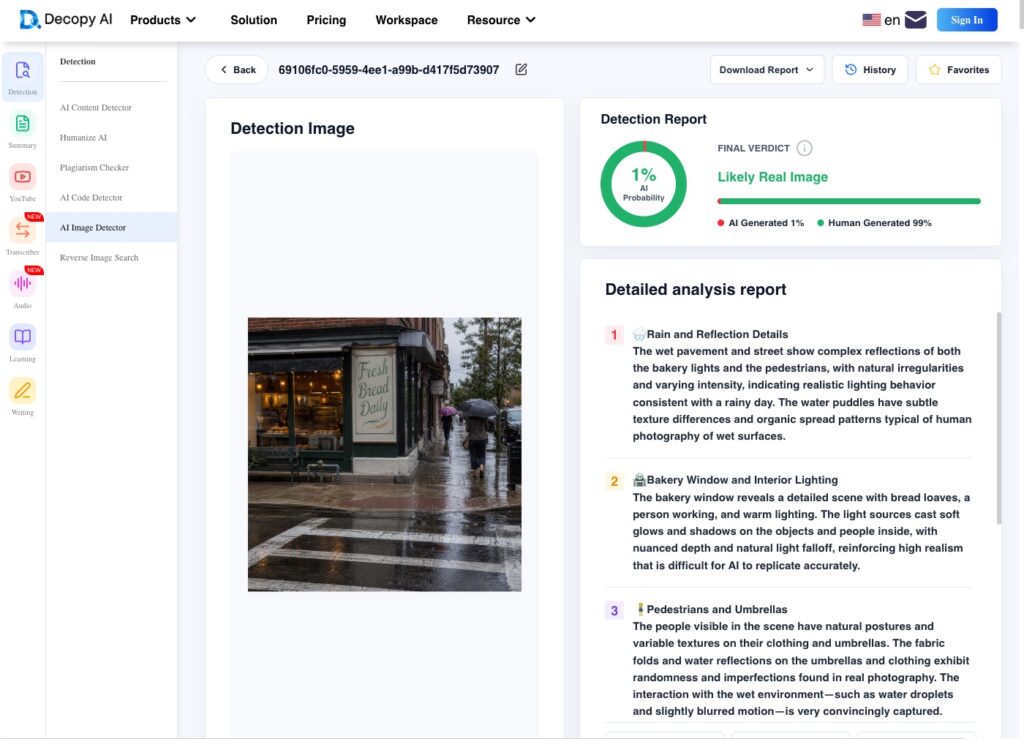
Decopy called my AI bakery image “Likely Real” at 1%, the same file Sightengine scored at 99%. Source: AI-Tutor.ai
Can detectors keep up with new generators?
BBC Verify journalist Shayan Sardarizadeh described outputs from the latest AI models as “frighteningly realistic,” with errors increasingly difficult for trained eyes to spot. He emphasized the growing importance of digital watermarking and provenance.
Shayan Sardarizadeh, Journalist, BBC Verify
Can You Check If an Image Is AI for Free?
Yes, all three detectors I used offered checks without payment. Sightengine also lists a free account plan with 2,000 operations monthly. I recommend treating free checks as an initial opinion that needs corroboration.
- Logged-out caps: Sightengine stopped me after eight scans; Decopy stopped after five.
- Account requirements: AI or Not required an account before a scan.
- Conflicting verdicts: My bakery image received opposite classifications from Sightengine and Decopy.
- Unreliable explanations: Decopy’s readable reports accompanied incorrect verdicts.
- Uncertain generator attribution: Sightengine sometimes named another generator above OpenAI.
Illuminarty completed every image in my test without hitting a cap, but that doesn’t establish unlimited use. Use free detectors to get a second and third opinion, comparing the same file across at least two tools.
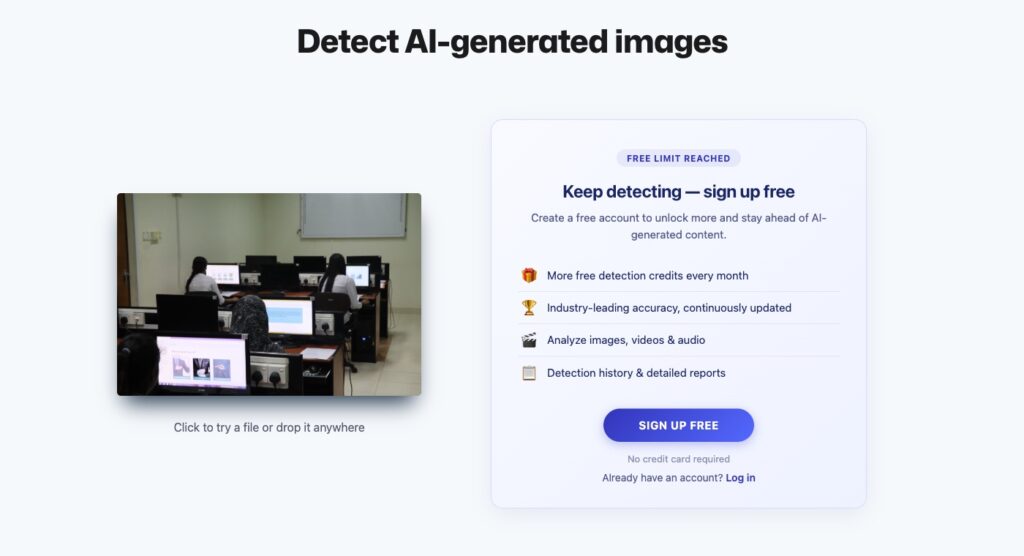
After eight logged-out scans, Sightengine showed me a “Free limit reached” sign-up wall, so my real photos never got a score. Source: AI-Tutor.ai
How Do Forensic Checks Spot AI Images?
- 🔎 What it checks: EXIF metadata, JPEG compression differences, and camera sensor noise
- 💻 Our recommendation: FotoForensics for error level analysis, plus a free EXIF viewer
- ✅ Free to use: Yes, but interpretation takes practice
A bright patch in a forensic image isn’t proof of AI generation. These checks add file-history or camera-origin clues whose meaning depends on how the image was processed.
- EXIF metadata: My real photos retained their camera models. That provides context, although metadata can be removed or fabricated.
- Error level analysis (ELA): FotoForensics highlights JPEG compression differences. Sharpening and high-contrast edges can also light up, so brightness alone doesn’t establish editing.
- Sensor noise (PRNU): Physical sensors leave faint fingerprints useful for camera identification. Compression and cropping weaken that evidence, and matching requires suitable reference material.
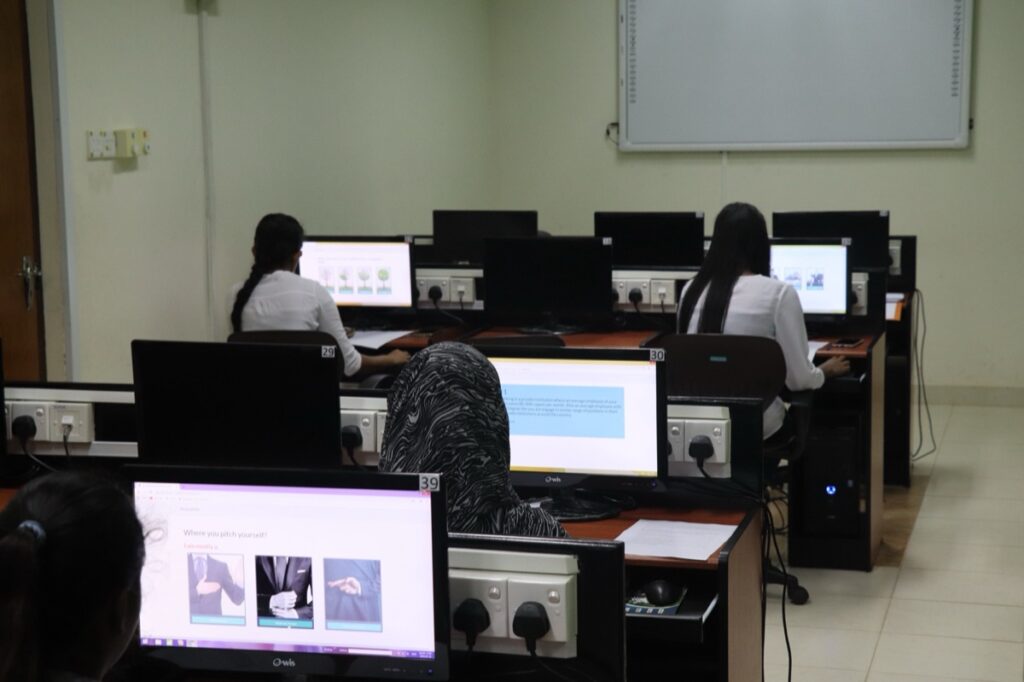
I found Canon EOS 77D details in this real classroom photo’s metadata. Photo: D.I.J. Samaranayake, Wikimedia Commons, CC BY-SA 4.0.
Pros
- ✔️ Accessible: Free tools and tutorials.
- ✔️ Provider-independent: No participating generator required.
- ✔️ Camera clues: Surviving EXIF provides context.
- ✔️ Editing clues: Compression differences can suggest areas to investigate.
- ✔️ Complementary evidence: Adds information beyond classifier scores.
Cons
- ❌ Interpretation: ELA is easy to misread.
- ❌ Fragile metadata: EXIF can be stripped or faked.
- ❌ Format restrictions: ELA requires JPEG images.
- ❌ Reference requirements: Sensor matching needs suitable camera reference images.
- ❌ Uncertain verdicts: No standalone yes-or-no AI answer.
Do You Need a Forensic Expert?
For ordinary homework images, I wouldn’t start with an expert. If a student faces suspected deepfake abuse, prioritize reporting over amateur analysis. Don’t upload intimate images of minors to public detector services.
The TAKE IT DOWN Act requires covered platforms to remove qualifying non-consensual intimate images within 48 hours of a valid request. FTC enforcement began in May 2026, and Massachusetts guidance directs schools to promptly investigate deepfake nude images of minors.
Alternative: Run a free layered check first, then hand it over
Everyday checks can identify reasons for concern. Cases involving someone’s safety or reputation need people who can investigate and act.
How Can You Spot AI-Generated Images by Eye?
- 🔎 What it checks: Inconsistent text, anatomy, lighting, and other visual details
- 💻 Tools I used: My own eyes, examining small background details
- ✅ Free to use: Yes
Extra fingers and garbled headline text are becoming less dependable clues for AI image detection. In my images, convincing main subjects appeared alongside questionable background details.
- AI classroom: Hands and goggles looked right. The worksheet contained scribbles resembling writing, and the periodic table was blurred.
- AI dog park: The dog’s anatomy looked convincing, but the frisbee logo contained garbled pseudo-text.
- AI bakery: The prominent “Fresh Bread Daily” sign was spelled perfectly. A smaller hanging sign farther down the street was illegible.
Small background text was the most useful manual clue in my examples. I wouldn’t reject an image just because a distant sign is blurry, though. Real photographs also lose readable detail through motion, focus, or compression.
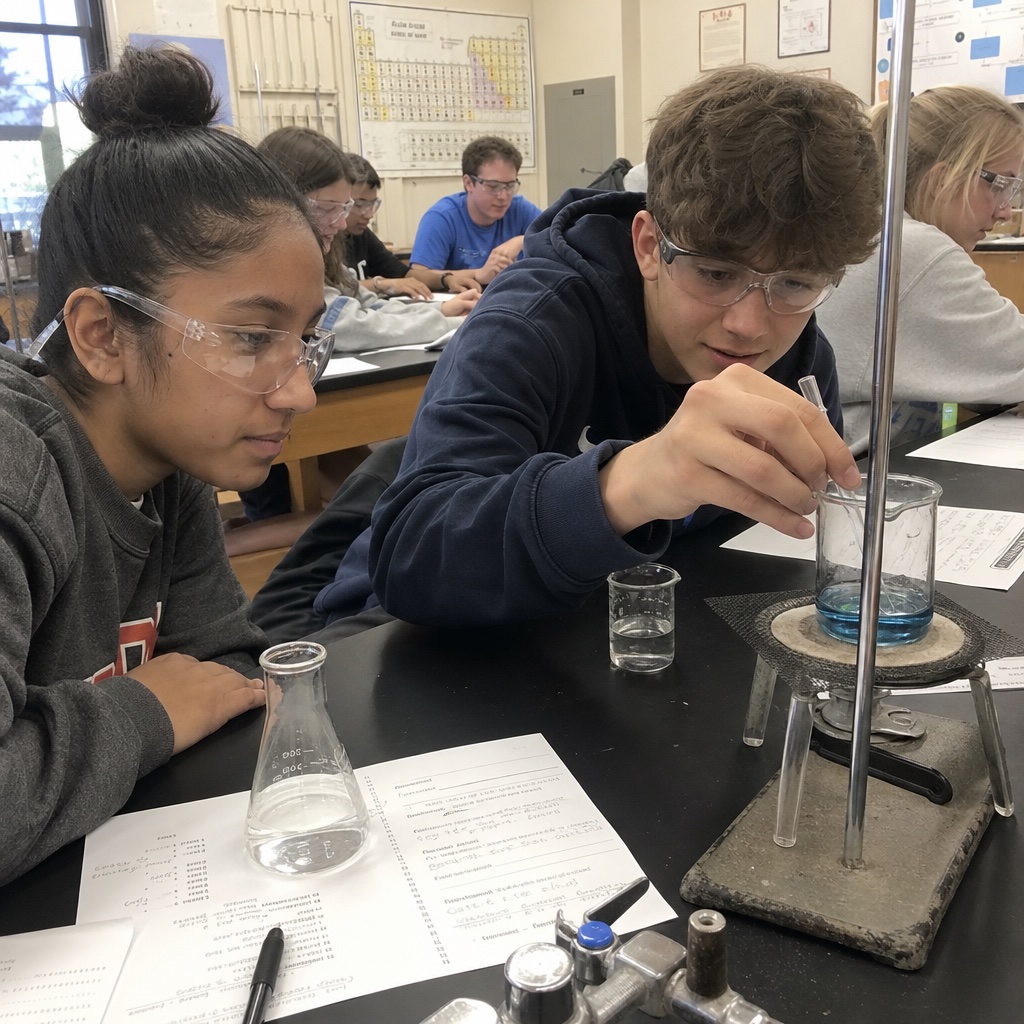
The worksheets in my AI classroom image looked like handwriting until I looked closely and found nothing readable. Source: AI-Tutor.ai
Human judgment also has measurable limits. In Gray and colleagues’ face study, typical participants identified AI faces only 31% of the time before training; brief training raised performance to about half.
A convincing face cannot establish that a photograph is real. Dunn and colleagues at UNSW and ANU found that advanced AI faces could give themselves away through unusual averageness and symmetry. Viewers were also overconfident, so feeling certain wasn’t a dependable check.
I recommend using visual inspection to identify details worth investigating. My classroom image passed a casual look at hands and goggles, yet its worksheet gave me a reason to examine it more closely.
Top Tip 💡
Inspect the background as closely as the subject. Try enlarging small signs or worksheet text: if writing that should be legible becomes meaningless marks, follow up with a detector. Keep blur and compression in mind before treating unreadability as evidence.
Additional Factors That Affect AI Image Detection
A screenshot can erase signed provenance before any detector sees the file. Check how the file reached you before interpreting a missing label or detector score:
- Compression: My quality-70 JPEG re-save stripped every AI image’s Content Credentials. Sightengine still strongly flagged the copies it scored, showing that provenance loss and classifier failure are separate issues.
- Screenshots: A screenshot creates a new file without the original C2PA manifest. SynthID can survive, although Google recommends cropping screenshots tightly before checking.
- Resizing: Wang and colleagues found resizing reduced detector performance. B-Free’s researchers likewise documented declines under simulated social-media processing that combined resizing with JPEG compression.
- Edits: A real photo with an AI-edited region differs from a wholly generated image. SynthID’s “all or part” wording matters when interpreting a positive result.
- New generators: The Chameleon benchmark exposed widespread misses on convincing synthetic images. Success on older outputs doesn’t establish accuracy on newer ones.
- Upscaling: AI upscalers can add generated detail to real photographs. That complicates a simple real-or-AI classification, especially when the original camera image is unavailable.
- Cropping: Removing the background would remove the small-text clues I spotted. Cropping can also weaken sensor-fingerprint analysis by leaving less material to compare.
- Text-heavy images: The TextRich benchmark found weaknesses on structured GPT-Image-2 outputs, including receipts and interface screenshots. Good performance on portraits doesn’t automatically transfer to these formats.
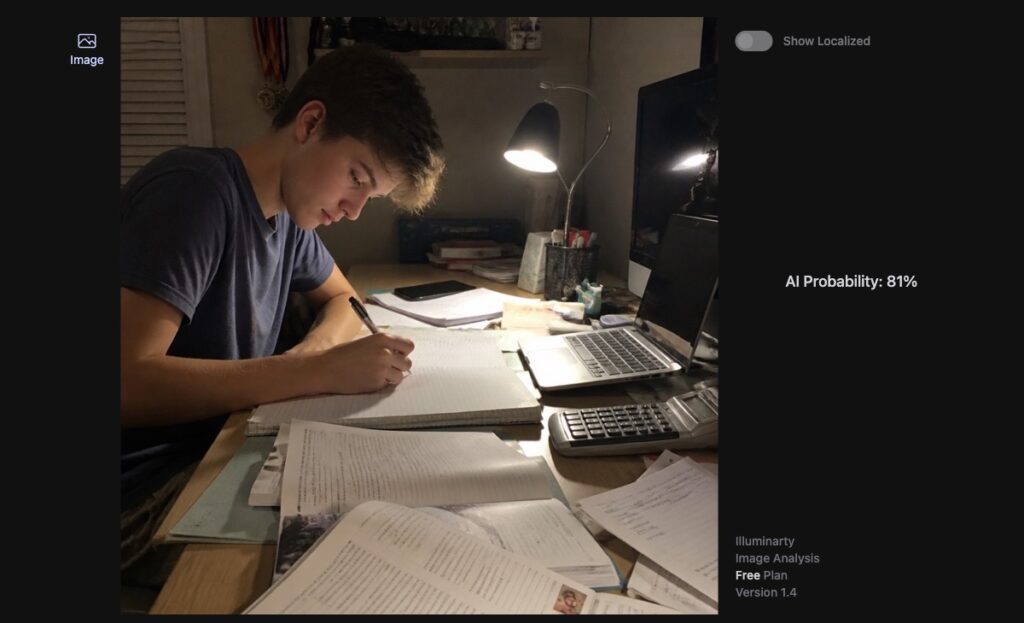
Illuminarty scored my re-saved AI student desk at 81%, almost identical to the original, so compression barely moved its verdict. Source: AI-Tutor.ai
How To Check If an Image Is AI-Generated
You can check an image for free, but you need more than one check. My conflicting bakery results show why stopping at the first confident answer can mislead you.
- Find the original file first. Ask for the original download where possible; screenshots discard provenance and may lose detail.
- Check Content Credentials before anything else. Open verify.contentauthenticity.org and inspect any issuer and creation statements.
- Run at least two different detectors and compare. Submit the same file so processing differences don’t complicate the comparison.
- Zoom into small text and background logos. Compare questionable details with the sharpness of nearby objects.
- Treat “no label” and a low score as unresolved. Neither result independently establishes a camera origin.
Add a reverse image search and look for the earliest identifiable publisher. Source context can resolve questions that a percentage cannot, including whether a picture has been recycled with a misleading caption.
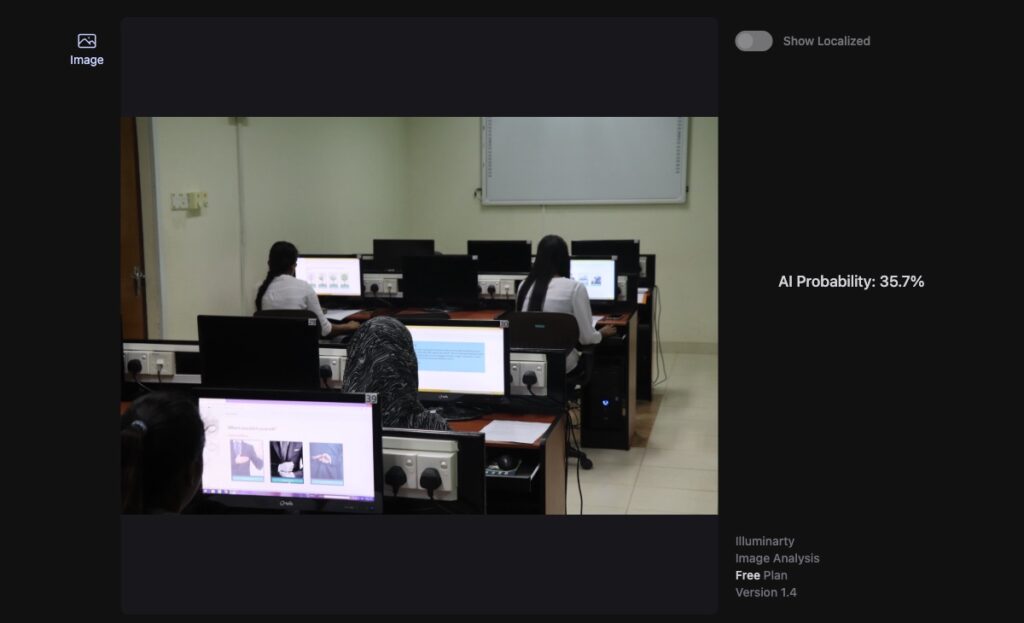
Illuminarty gave this real classroom photo a higher AI score than two of my AI images, which is why I never rely on one detector. Source: AI-Tutor.ai
Final Verdict: How Does AI Image Detection Work?
Start AI image detection with provenance, then compare detector results and inspect the details. Each method answers a different question:
- Content Credentials (C2PA): strong origin evidence when valid and trusted; absent after my JPEG re-save.
- Invisible watermarks: can survive re-saves, but cover only participating providers and remain fallible.
- Classifier detectors: fast estimates that ranged from 99% to 1% on my bakery image.
- Forensic checks: useful file-history and camera clues that need careful interpretation.
- Your own eyes: small background text provided the strongest manual clues in my examples.
My test showed why that order matters: signed records identified the originals, while classifier agreement and visual realism were much less dependable. I recommend comparing two detectors rather than accepting the first confident verdict.
No missing label or low score clears an image on its own. Before sharing an accusation, check the source and preserve uncertainty where the evidence doesn’t settle the question.
If you’re a student or teacher who wants to understand AI beyond detection scores, AI-Tutor.ai is a place to explore how AI works and learn to question its outputs thoughtfully.