Grammarly’s AI detector is worth trying for a quick essay check, but its free results don’t give you much to investigate. It flagged all 3 raw AI essays I submitted and returned 0% for a real student essay, without showing which sentences influenced those scores.
The two GPT essays scored 100%, while the Claude essay scored 80%. That’s an encouraging result for this small set, not evidence that Grammarly can reliably identify the origin of any document.
For students, the free checker is the sensible starting point. Grammarly Pro makes more sense if you also want writing assistance and plagiarism checking, rather than simply another way to see an AI percentage.
Key Takeaways
- All 3 raw AI essays were flagged: GPT-6 and GPT-4o mini scored 100%; Claude Opus 5.5 scored 80%.
- The human essay scored 0%: A useful result, although one human sample cannot establish a false-positive rate.
- Free results lack detail: I received a percentage without sentence highlighting or an explanation.
- Pro requires a broader reason to buy: Approximate US pricing starts at $12 per month with annual billing.
- Authorship serves a different purpose: It documents writing development instead of predicting authorship from finished text.
Grammarly AI Detector Pros & Cons
Grammarly’s main strength is its straightforward checking process. Its biggest weakness is what happens afterward: the free score gives you little help understanding the result.
Advantages
- ✔️ Quick results: My pasted essays returned scores in a few seconds, with no software installation needed.
- ✔️ Promising results on raw AI output: All 3 generated essays received high AI scores.
- ✔️ Strong student writing wasn’t automatically flagged: The top-scored 11th-grade essay returned 0%, despite sharing a topic with a GPT sample.
- ✔️ A separate process-tracking option: Free Authorship can document how a draft develops, giving you context beyond a detector result.
Drawbacks
- ❌ No free passage-level detail: My results didn’t identify particular sentences or paragraphs.
- ❌ Limited document size: The interface displayed a 1,400-word counter, while Grammarly states a 10,000-character limit.
- ❌ English-only detection: It isn’t suitable for checking assignments written in other languages.
- ❌ A score isn’t a writing diagnosis: Even the paid highlighting doesn’t explain why particular language was flagged.
How Much Does Grammarly AI Detector Cost?
The public web detector is free. Grammarly Pro adds in-document AI detection with marked passages, alongside plagiarism checks and broader writing features.
Approximate US pricing is $12 per month when billed annually, or $144 for the year. Paying monthly costs around $30 per month; prices vary by region, so check the total before committing.
| Option | Approximate cost | What you get |
|---|---|---|
| Free web detector | $0 | A percentage-based AI result |
| Grammarly Free | $0 | Basic writing assistance and Authorship |
| Grammarly Pro, annual billing | $12/month, paid as $144/year | In-document AI detection, marked passages, plagiarism checking, and additional writing tools |
| Grammarly Pro, monthly billing | $30/month | The same Pro feature bundle without an annual commitment |
The distinction between the free website and Grammarly’s writing app matters. You can use the public detector without buying Pro, even though in-app AI detection is a paid capability.
Is Grammarly Pro Good Value?
For detection alone, stick with the free checker first. Paying for highlighted passages gives you more detail, but it doesn’t turn an estimate into proof.
Pro becomes easier to justify when you regularly need several parts of the bundle:
- Choose Free for an occasional preliminary check.
- Consider Pro if you also need plagiarism checking and writing assistance.
- Check your school’s access before paying for a personal subscription.
Annual billing brings the monthly equivalent down considerably, but you’re still committing $144 upfront. Don’t make that commitment just to investigate one unexpected score.
My Experience With Grammarly AI Detector
Getting a result was straightforward; understanding it was less useful. I pasted each essay into the free website, selected “Scan for AI,” and received a percentage within a few seconds.
The page also offered file upload, although my recorded results came from pasted text. I could paste the text and scan it directly on the page.
I could run the first check without an account, but Grammarly asked me to sign up when I tried another. If you want to check several drafts, plan on creating an account.
Adding an Essay
The text box displayed a word counter beneath the essay. For the Claude sample, it read “442/1,400 words,” making it easy to see that the text was comfortably within the displayed allowance.
Grammarly separately states a 10,000-character limit. Words and characters aren’t interchangeable, so don’t assume that every 1,400-word assignment will fit.
For longer papers, check the displayed limits before you start. If you need to divide the text, use coherent sections rather than isolated sentences, since Grammarly says shorter passages are harder to classify.
Understanding the Result
My Claude essay produced a half-circle gauge headed “80% of this text appears to be AI-generated.” Underneath, the result divided the text between “Resembles AI text” and “No AI text patterns found.”
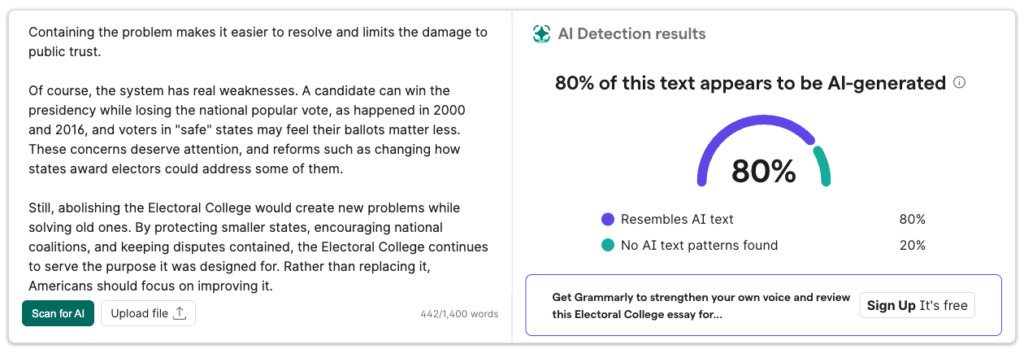
My Claude essay scored 80%, but the result didn’t identify individual sentences.
The percentage was easy to find, but I couldn’t use the result to locate a particular passage. There were no sentence highlights, paragraph scores, or explanations behind the judgment.
That makes the free tool better suited to an initial check than a detailed review. If you’re looking for specific feedback on your writing, the gauge won’t tell you whether an introduction, transition, or conclusion contributed most to the score.
Testing takeaway: The free result answered “Does this resemble AI writing?” but not “Which passages should I examine?”
How Accurate Is Grammarly AI Detector?
Grammarly separated the raw AI essays from the human essay in this four-sample test. The individual scores are useful evidence, but the sample is too small to support a general accuracy percentage.
The AI essays were unedited outputs written for high-school-style assignments. The human comparison was a real 11th-grade argumentative essay that earned 6/6 and was written before ChatGPT existed.
| Sample | Source | Length | Grammarly result |
|---|---|---|---|
| Distance-learning argument | GPT-6, raw output | 452 words | 100% AI |
| Summer-projects essay | GPT-4o mini, raw output | 457 words | 100% AI |
| Electoral College essay | Claude Opus 5.5, raw output | 442 words | 80% AI |
| Distance-learning argument | Real 11th-grade student | 606 words | 0% AI |
Both GPT Essays Scored 100%
Grammarly gave the GPT-6 distance-learning essay and GPT-4o mini summer-projects essay its highest AI score. Neither sample had been edited or paraphrased before scanning.
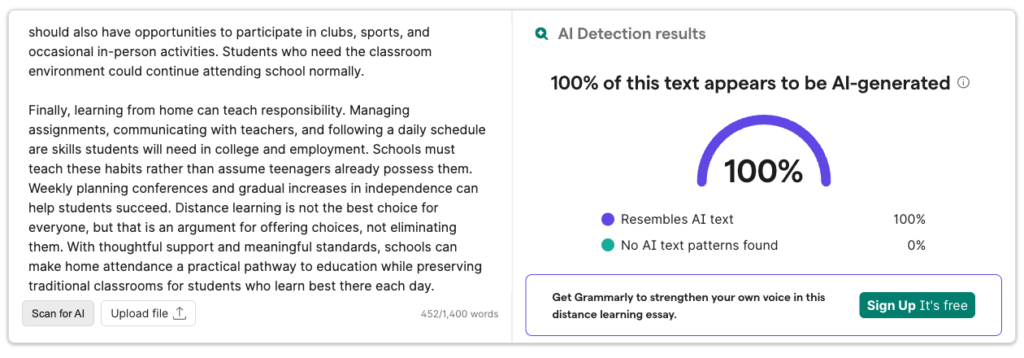
My raw GPT-6 essay reached 100% on Grammarly’s gauge.
These results support using Grammarly to spot straightforward generated prose. They don’t show that it will recognize every essay from those models, particularly after substantial revision.
Claude Scored Lower, but Was Still Flagged
The Claude essay scored 80%, which was 20 points below both GPT samples. That’s a difference between these particular essays, not enough evidence to call Grammarly weaker at detecting Claude generally.
80% does not mean that a human wrote the remaining fifth. The entire sample was AI-generated, even though Grammarly returned a lower score for it.
Grammarly describes its score as an averaged estimate. It isn’t a verified breakdown of who wrote each word, or the probability that a student broke a rule.
The Human Essay Scored 0%
The student essay returned 0% despite being strong, top-scored writing. It also addressed distance learning, giving it a shared subject with the GPT-6 sample.
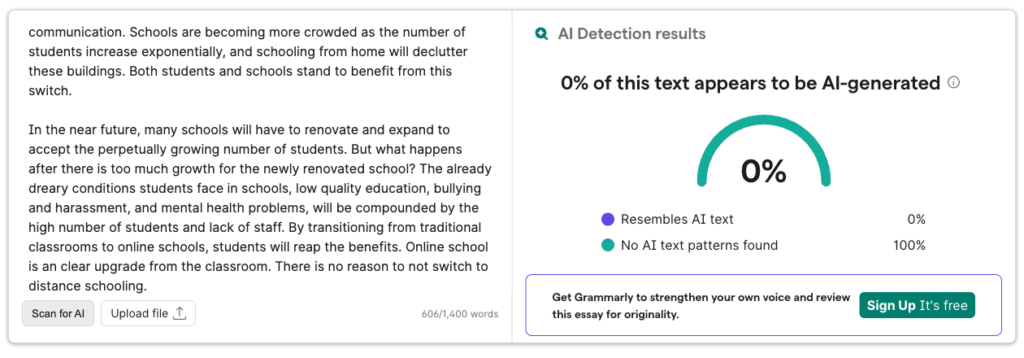
I received a 0% result for the student essay on the same topic as the GPT-6 sample.
That comparison is encouraging, but the essays weren’t identical in length or composition. One correctly cleared human document cannot tell you how often other human writing might be flagged.
Where You Should Be Careful
Grammarly acknowledges that revised, paraphrased, and mixed human-AI writing is harder to classify. It also warns that writing by English-language learners can resemble AI patterns.
For that reason, a high score deserves closer reading rather than an automatic conclusion. Draft history and the context of the assignment offer information that a finished-text scan cannot provide.
Using Grammarly Authorship
Authorship is the more relevant feature if you want to document your writing process. Unlike the detector, it tracks how text enters and develops in a document rather than estimating its origin afterward.
It’s available on Grammarly Free and Pro, with support for Google Docs through the browser extension, Microsoft Word through the desktop app, and the Grammarly editor.
Its capabilities include:
- Categorizing typed, pasted, and Grammarly-assisted text.
- Showing document development through history and replay.
- Creating a report you can choose to share.
Enable tracking before drafting, since it doesn’t retrospectively document earlier writing. You generate and share the report yourself; Grammarly doesn’t automatically send it to an instructor.
The useful distinction is process versus prediction. A detector evaluates the finished language, while Authorship provides a record of the document’s development.
Read the category details and replay rather than relying only on a headline chart. The report adds context, but it doesn’t independently establish whether your tool use follows an assignment’s rules.
How Does Grammarly Compare to Other AI Detectors?
Choose an alternative for its workflow, not because you expect its score to settle every disagreement. This test doesn’t establish an accuracy ranking between Grammarly and competing detectors.
Grammarly is a practical starting point if you already use its writing tools. Its combination of a public checker and optional process tracking is useful, although the free detector itself remains basic.
| Tool | Practical role | When to consider it |
|---|---|---|
| Grammarly | Public checking alongside a wider writing toolkit | You want an initial score or already use Grammarly |
| Turnitin | Institution-managed submission review | Your school uses it within its assessment process |
| GPTZero | A dedicated AI-detection service | Detection is your main requirement rather than general writing help |
| Originality.ai | AI detection alongside plagiarism checking | You review content and want both types of checks |
| QuillBot | Detection within another writing toolkit | You already work with QuillBot’s tools |
Turnitin differs most clearly in access: it’s an institutional service rather than an individual subscription for students. If your school uses it, its submission workflow matters more than trying to reproduce its result elsewhere.
GPTZero and Originality.ai are worth comparing when detection is the main reason you’re shopping. QuillBot is a more natural comparison if you’re choosing a broader writing toolkit.
Before switching, decide whether you need passage-level detail, document handling, or a particular integration. Those are more useful purchasing criteria than choosing whichever detector returns your preferred number.
Also check your school’s rules before uploading student work to another service.
How We Tested Grammarly AI Detector
I tested 4 essays with known sources on October 22, 2026, using Grammarly’s free web detector in a desktop browser. The set covered unedited AI output and human writing, so the results don’t establish performance on rewritten or mixed-author text.
I submitted 3 unedited essays from GPT-6, GPT-4o mini, and Claude Opus 5.5, plus one real 11th-grade essay written before ChatGPT. The samples ranged from 442 to 606 words.
The assessment covered the returned scores, the visible result detail, and the basic paste-and-scan experience. The hands-on assessment covers the free detector; paid features and Authorship weren’t part of this test.
Four essays cannot establish an overall accuracy or false-positive rate. Prices reflect October 2026 and vary by region.
Grammarly AI Detector Review: My Verdict
Use Grammarly for a preliminary check, not as the deciding evidence about who wrote an essay. Its results were promising on these raw AI samples, and the human essay received 0%.
The free checker’s limitation is the lack of explanation. It gives you a number quickly, but not the detail needed to understand or challenge that number.
Who Should Use It?
- Students seeking a quick check: Start with the free web tool.
- Existing Grammarly users: Consider whether detection fits your current writing workflow.
- Writers documenting their process: Look at Authorship before beginning a draft.
Skip Pro if an occasional AI score is your only requirement. Consider paying only when the broader writing and plagiarism features justify the cost, and keep your drafts regardless of which detector you choose.
FAQs
Is Grammarly AI Detector free?
Yes, the public web detector is free. It returns a percentage-based result, while in-document detection with marked passages is part of Grammarly Pro.
The free interface displayed a 1,400-word counter in my test, and Grammarly states a 10,000-character limit.
Can Grammarly detect ChatGPT and Claude?
It flagged the raw GPT and Claude essays in this test. GPT-6 and GPT-4o mini scored 100%, while Claude Opus 5.5 scored 80%.
Those results cover one essay from each model, so they shouldn’t be treated as a promise about every output.
Does a 100% AI score prove an essay was generated?
No. A 100% score means the detector strongly classified the text as resembling AI writing, not that it independently verified the author.
Grammarly itself says detectors cannot conclusively determine whether AI was used. Review the writing and its development before drawing conclusions.
Will Grammarly corrections make my essay look AI-generated?
Grammarly says standard grammar corrections typically don’t change its own detector score, while output from its Paraphraser and Humanizer agents is likely to be flagged.
Proofreading and generative rewriting are different activities. Check which your assignment permits, and don’t assume another detector will respond identically.
Is Grammarly more reliable than Turnitin?
This test doesn’t establish that. Grammarly and Turnitin use different detection systems, so their results can differ.
Choose according to access and purpose: Grammarly offers a public checker, while Turnitin operates through institutions. Neither result replaces a review of the writing process.
Should I rewrite an essay just to lower its AI score?
No. Revise unclear arguments, unsupported claims, and awkward phrasing because they weaken the essay, not simply because a detector returns a high number.
If the work is yours, keep your drafts and version history. A lower percentage isn’t a substitute for clear writing or a documented process.