Thinkific is a well-established hosted course platform used by subject-matter experts, training businesses, and independent educators to build and sell online courses, memberships, and learning communities.
It’s a capable platform with a lot to offer — but at its current price points, it’s not the right fit for everyone.
In this review, I’ll walk through Thinkific’s pricing, features, AI tools, and real testing experience so you can decide whether it’s the right home for your courses or learning community.
Why You Can Trust This Review
We’ve spent extensive hours testing course platforms hands-on — setting up schools, uploading content, going through checkout flows, and stress-testing community features.
Our recommendations are independent, data-driven, and updated regularly to reflect platform changes. Read more about our research methodology below.
Thinkific: Pros & Cons
| Rating | Best For | Paid Plans | Free Trial |
|---|---|---|---|
| ⭐⭐⭐⭐½ (4.6/5) | Structured online learning and AI-powered course creation | $49 – $199/month (custom pricing for Plus) | 30 days |
Pros
- Built-in AI course builder and content tools
- Strong community features with live events and discussion spaces
- Flexible monetization: subscriptions, payment plans, bundles, BNPL
Cons
- No free plan — entry-level pricing starts at $49/month
- Key features like certificates and assignments require higher-tier plans
- SCORM support is locked behind the enterprise Plus plan
What I Like
- ✔️ The AI course builder generates outlines, lesson drafts, quizzes, and worksheets — dramatically cutting the time it takes to launch a new course
- ✔️ TCommerce (Thinkific’s native checkout) supports Apple Pay, Google Pay, BNPL, abandoned cart recovery, and smart card retries out of the box
- ✔️ Community spaces are genuinely well-built, with live events, activity feeds, and member profiles that rival standalone community platforms
- ✔️ The platform scales from solo creators all the way to enterprise training portals — you won’t outgrow it quickly
What I Dislike
- ❌ Removing the free plan raises the barrier to entry for hobbyists and early-stage creators who want to test before committing
- ❌ Many of the most useful features — assignments, certificates, private courses — are locked to Start or Grow tier, pushing costs up faster than you’d expect
- ❌ Marketing automation is limited; most serious creators will still need an external email platform alongside Thinkific
- ❌ The branded mobile app is a $199/month add-on, not included in any standard plan
My Experience With Thinkific
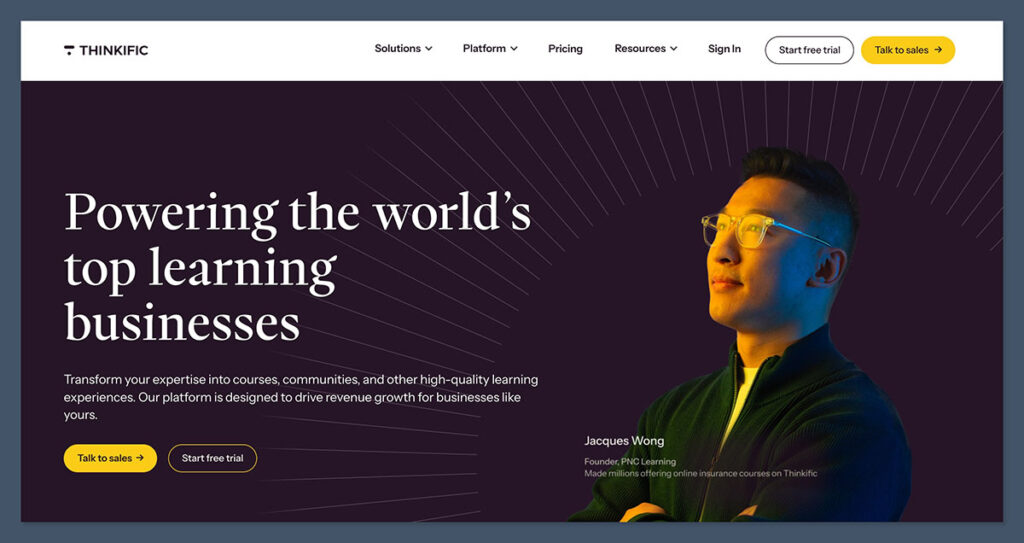
Getting started with Thinkific is straightforward. The 30-day free trial doesn’t require a credit card, and the onboarding asks you a handful of questions about your goals — whether you’re building a standalone course, a membership community, or a B2B training portal.
The answers seem to shape which dashboard shortcuts Thinkific highlights first, though the overall interface stays the same regardless of what you choose.
The dashboard itself is clean and well-organized. Left-hand navigation covers your course library, communities, sales, and analytics without any clutter.
For someone setting up their first course school, this is a genuinely low-friction experience.
Author’s Testing Notes
I was pleased to see Al tools woven into the course-building workflow from the start — not bolted on as an afterthought. When I began building a sample course on adult learning strategies, the Al builder generated a full outline with module names, lesson titles, suggested learning outcomes, and even a draft quiz within a couple of minutes. That said, the quality of the draft content required meaningful editing before it felt like something I’d actually publish. Think of it as a strong first draft, not a finished product.
How I Built a Course
Thinkific’s drag-and-drop course builder supports a wide variety of content types: video lessons, text pages, audio files, PDFs, quizzes, assignments, multimedia presentations, and community activities. I uploaded a mix of video and PDF content without any technical friction.
Built-in video hosting handles HD playback, captions, and chapter markers, so there’s no need to maintain a separate Vimeo or Wistia account.
Adding a quiz took less than five minutes. I could set a passing score, allow retakes, and configure whether learners could skip ahead before completing each section — a compliance-style feature that’s useful for professional certification programs.
The only catch: assignment submission and completion certificates only unlock from the Start plan upward.
Building the Course School
Beyond individual courses, Thinkific gives you a full site builder to create a course school homepage, sales pages, and checkout flows.
Custom domain support works on all paid plans, and you can strip out Thinkific’s branding on higher tiers. The site builder is functional rather than spectacular — it’s not going to win awards for design flexibility — but it’s more than sufficient for a professional-looking learning site without needing to code anything.
Author’s Testing Notes
If you already run a WordPress site or another main website, Thinkific is easy to embed as a subdomain or connected learning portal. You don’t have to abandon your existing web presence to use it — which is a meaningful practical advantage for creators who’ve already built an audience elsewhere.
How Much Does Thinkific Cost?
Thinkific’s pricing is split across three public plans, ranging from $49 to $199 per month when billed monthly. Annual billing brings a 25% discount across all tiers. There’s no free plan — Thinkific removed it — but a 30-day free trial is available without entering credit card details.
| Plan | Monthly (billed monthly) | Effective monthly (annual) | Best for |
|---|---|---|---|
| Basic | $49/month | $36/month | Early-stage creators needing unlimited courses and core tools |
| Start | $99/month | $74/month | Growing course businesses needing certificates, bundles, and more admin seats |
| Grow | $199/month | $149/month | Established schools needing advanced sales tools and priority support |
| Plus | Custom | Custom | Enterprise training businesses needing SCORM, SSO, and CRM integrations |
Is Thinkific Good Value for Money?
Thinkific sits at a higher price point than some newer competitors, and several independent reviewers have flagged this. The Basic plan at $49/month is a reasonable entry point for full course creation, but the features most serious course creators want — certificates, assignments, private courses, and community bundles — sit behind the $99 Start plan.
The branded mobile app adds another $199/month on top of whichever plan you choose, which is a significant extra cost.
All plans use Thinkific Payments as the native checkout processor, with standard card processing fees around 2.9%. Using a third-party processor like Stripe or PayPal adds extra gateway fees, which is worth factoring into your margin calculations.
Author’s Testing Notes
For most creators building a serious course business, I’d recommend starting on the Start blan rather than Basic. The certificate and assignment features are near-essential for professional courses, and they’re not available on Basic. If you’re just testing the concept, the 30-day trial gives you enough runway to validate your idea before spending anything.
Thinkific’s AI Features
Thinkific has invested heavily in AI tools across its platform, and it shows. The AI course builder is the headline feature, but the AI assistance runs deeper than just course creation:
- Generate complete course outlines from a topic prompt, including module structure and individual lesson titles
- Draft lesson content, quizzes, worksheets, and learning outcome summaries with a single click
- Adapt generated content for different learner levels (introductory, intermediate, advanced)
- AI teaching assistant for learners (available on Plus), answering student questions within the course experience itself
- AI marketing tools to support sales page copy and course descriptions
For a blog focused on AI tutoring and lifelong learning, this is one of Thinkific’s strongest selling points. The platform isn’t just AI-assisted for creators — it’s starting to bring AI into the learner experience too, particularly at the enterprise tier.
Core Learning Features
Course Creation and Content
Thinkific’s course builder supports video, audio, PDFs, quizzes, assignments, multimedia, presentations, and community activities through a clean visual interface. Built-in video hosting includes HD playback, captions, download controls, and chapter markers. Quizzes support multiple-choice questions, configurable passing scores, and retake options. Assignments with file upload submissions and compliance tools (to prevent lesson skipping) are available from the Start plan upward.
Communities and Engagement
Thinkific’s community tools have matured significantly. Standalone communities include spaces and channels, live events, activity feeds, discussion threads, member profiles, mentions, and push notifications. Communities can be bundled with courses or sold as memberships, turning a course catalog into an ongoing learning environment.
Basic and Start plans include one community. Grow expands this to three. Plus offers unlimited communities with more spaces and event capacity.
Payments and Monetization
Thinkific handles native checkout with credit cards, Apple Pay, Google Pay, BNPL options, gifting, group orders, abandoned cart reminders, and smart card retries. Pricing models include one-time payments, subscriptions, payment plans, free trials, upsells, order bumps, coupons, and product bundles. B2B group orders and bulk invoicing are available for selling access to teams and organizations.
A built-in affiliate program lets you run your own referral system with commission tracking and reporting — no third-party tool required.
Analytics and Admin
Thinkific’s analytics dashboards cover revenue, monthly recurring revenue, enrollments, learner progress, quiz performance, and course drop-off points. Admin roles include site admins, course admins (from Start), and enterprise-level permissions on Plus. Bulk import and enrolment tools are available on higher tiers for managing larger student populations.
Integrations
Thinkific’s app store covers the major categories: Zapier, Mailchimp, ActiveCampaign, ConvertKit, HubSpot, Zoom, and Google Analytics. The Plus plan adds deeper CRM integrations with HubSpot and Salesforce, SSO, and SCORM support for corporate e-learning assets. For most creators, Zapier handles the integration gaps that aren’t natively covered.
Mobile Experience
Thinkific includes a student mobile app with push notifications, drip alerts, and access to courses and communities. The standard app is Thinkific-branded. A white-label branded mobile app — with your own app name and icon on the App Store and Google Play — is available as an add-on at $199 per month, or on higher Plus tiers. This is a meaningful feature for creators building a recognizable brand around their school, but the price is steep as an add-on.
Security
Thinkific handles hosting, security, and platform maintenance on your behalf. All schools run with SSL certificates, and learner payment data is processed through PCI-compliant checkout flows. For enterprise customers on Plus, dedicated SLAs, sandbox environments, and a dedicated success team add another layer of reliability. Because Thinkific is a fully hosted platform, there’s no server maintenance or security patching on the creator’s side — it’s all managed for you.
Customer Support
Thinkific’s support offering varies by plan. Core support includes a detailed help center with guides and video tutorials, a community forum, and email-based ticket support. Higher-tier plans unlock priority support and faster response times. Plus customers get a dedicated customer success team — closer to an account management relationship than standard support.
The help documentation is thorough and well-organized. For the most common setup questions — domains, checkout, video upload — the answers are easy to find without opening a ticket. That said, Thinkific doesn’t offer 24/7 live chat the way some competitors do, which can be a frustration for creators in non-US time zones.
How Does Thinkific Compare to Competitors?
Thinkific occupies a specific and well-defined position in the course platform landscape:
- Vs. Teachable: Thinkific leans harder into learning experience, community, and native checkout. Teachable has historically emphasized simpler course selling but has faced criticism for recent pricing changes. Thinkific is the stronger choice for creators who prioritize learning quality and learner progression tools.
- Vs. Kajabi: Kajabi is an all-in-one marketing platform that bundles email automation, sales funnels, and broader digital products at a higher price. Thinkific is more course-centric with better structured learning tools; Kajabi wins if marketing automation is your primary need.
- Vs. Mighty Networks / Circle: Thinkific wins on structured courses, learning paths, and assessments. Community-first platforms like Mighty Networks have deeper social dynamics and native content feeds, but lack Thinkific’s course delivery depth.
How We Test Course Platforms
Our testing covers seven key areas, each weighted based on what matters most for online learning platforms:
- Learning Features – 30%: Course builder, assessments, certificates, drip scheduling, and learner management
- Platform Functionality – 15%: Marketing, SEO, integrations, and automation capabilities
- Help and Support – 15%: Support channels, documentation quality, and response reliability
- Design and Branding – 15%: Site builder, templates, customization, and white-label options
- Pricing – 10%: Plan value, feature gating, and total cost of ownership
- User Experience – 10%: Hands-on ease of use for both creators and learners
- Reputation – 5%: Community feedback, third-party reviews, and platform stability
Thinkific Review: Should You Build Your Course School With Thinkific?
Thinkific is a strong, mature platform for creators who take education seriously. Its AI course builder genuinely speeds up content creation, its community tools are among the best bundled into a course platform, and TCommerce handles monetization without requiring third-party checkout workarounds.
For lifelong learning communities, professional certification programs, and subject-matter experts building a sustainable course business, Thinkific is one of the most capable options available.
The trade-offs are real, though. The removal of the free plan raises the cost floor, key features are gated behind higher tiers, and marketing automation still requires external tools for most serious creators.
If all-in-one marketing is your priority, Kajabi may serve you better. If budget is the primary constraint, newer and cheaper platforms exist.
But if structured learning, AI-assisted course creation, and a scalable platform that grows with your school are what you’re after — Thinkific delivers. Start with the 30-day free trial to see how it fits your workflow before committing to a paid plan.