I’ve been on something of an odd journey with AI detectors in the last year or so. Not so long ago, I was adamant that not a single tool could really be trusted. That happens after enough detectors have told you a page you distinctly remember researching and writing yourself is probably AI slop.
Now, I’m using at least one of these tools pretty much every day. I still don’t think they’re completely infallible, but I’ve found at least a few I can trust to give me a reasonably good idea of whether a piece of content needs a bit of extra scepticism, and I’m taking a closer look at two of those today: Pangram and GPTZero.
The first thing I’ll say is that they’re a lot closer in overall performance than they used to be, but each tool still scores higher in certain areas.
Quick Verdict: Pangram vs GPTZero
I’ll probably continue to use them both.
GPTZero is the low-cost, easy-to-use option that’s actually fairly good at flagging mixed human and AI text, and giving users useful extra tools, for things like writing feedback and plagiarism scans.
Pangram is my most trusted AI detector thanks to its ultra-low false positive scores, high accuracy rates (even on humanized AI text), and surprisingly strong multi-language coverage.
| Comparison Point | Pangram | GPTZero |
|---|---|---|
| Best for | Overall AI detection and high accuracy | Fast AI detection and writing support |
| Free plan | 2,000 words and 3 image scans a day | 10,000 words per month |
| Starting price | $20 per month ($15 billed annually) | $23.99 per month ($12.99 billed annually) |
| Good for detecting | Pure AI text, mixed AI-human text, paraphrased content, and human text | Pure AI, mixed, and human text |
| False-positive rate | 1 in 10,000 | Under 1 in 100 |
| Extra features | AI image detection, writing replay through Google Docs, and plagiarism checks | Plagiarism checks, writing replay, writing assistance tools |
| Language support | 24 | 27 |
| Integrations | Browser extensions, LMS tools, Google Docs, API and MCP | Browser extensions, Google Docs, LMS tools, and API |

Pangram
See pricing Visit Pangram →Free: 2,000 words a day
From $20 / month
$15 / month paid annually
- 1 in 10,000 false-positive rate
- Catches humanized and paraphrased AI
- AI image detection with heatmaps
- Chrome extension, LMS tools, API and MCP

GPTZero
See pricing Visit GPTZero →Free: 10,000 words a month
From $23.99 / month
$12.99 / month paid annually
- Flags mixed human and AI text
- Advanced Scan and AI Patterns reports
- Writing feedback and citation checks
- 27 languages
Pangram vs GPTZero Pricing: Which is Better Value?
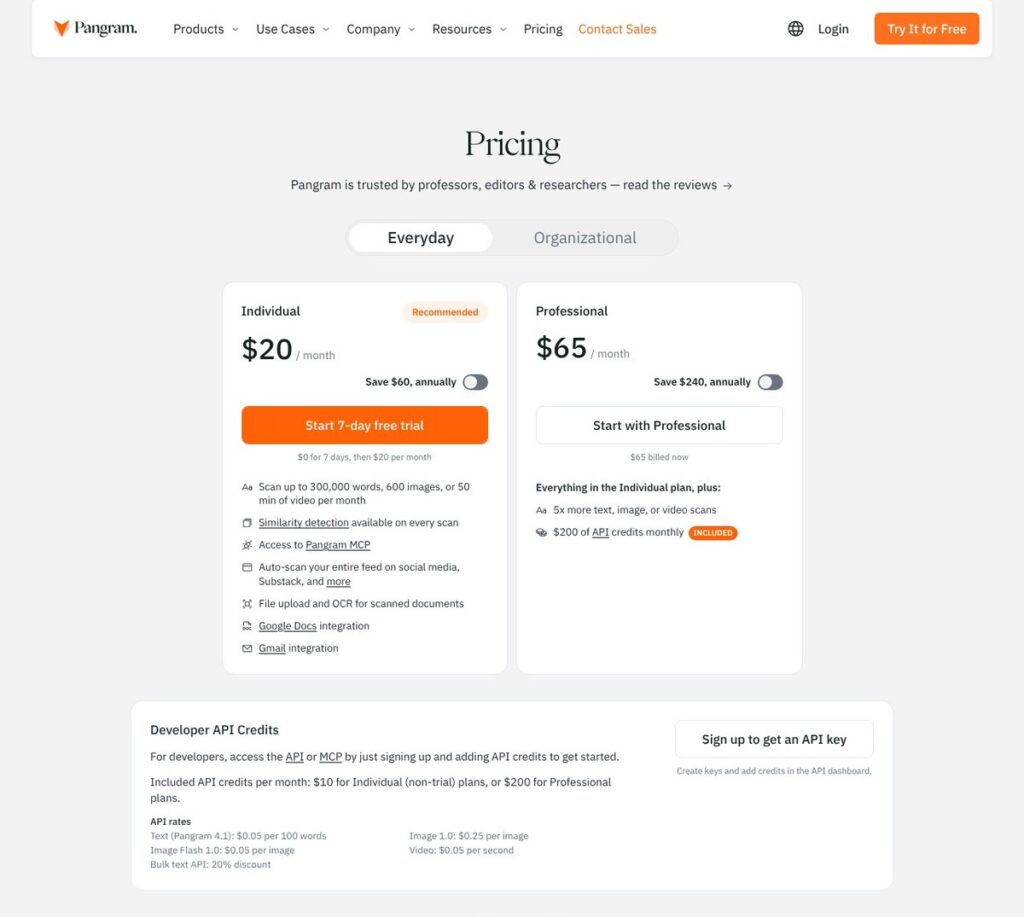
GPTZero will probably get the early win for users on a budget, because its free plan is quite a bit more generous. If you don’t want to pay anything, you can still use Pangram to check up to 2,000 words per day and 3 images, while GPTZero gives you up to 10,000 words a month (there’s no image detection option, though).
Beyond the free plan, however, Pangram’s pricing starts to give users a bit more value for money. The Individual plan is $20 per month (or $15 annually) for 300,000 words and 600 image scans, Teams is priced the same way, although you need a two-user minimum. Professional costs $65 per month or $45 when you pay annually, for 1.5 million words, 3,000 image scans, and $200 in API credits a month.
You can also request custom enterprise pricing, or get pay-as-you-go access to Pangram’s API (starting at $0.05 for every 100 words).
On the other hand, GPTZero’s cheapest paid plan is now Premium ($23.99 per month or $12.99 annually), which matches Pangram’s Individual plan in terms of the number of words you can scan (300,000 a month), but there are no image options included, so I think Pangram gives you the better deal.
Plus, the GPTZero Professional plan ($45.99 monthly or $24.99 per month annually) gives you one-third the word allowance than you get from Pangram’s Professional plan.
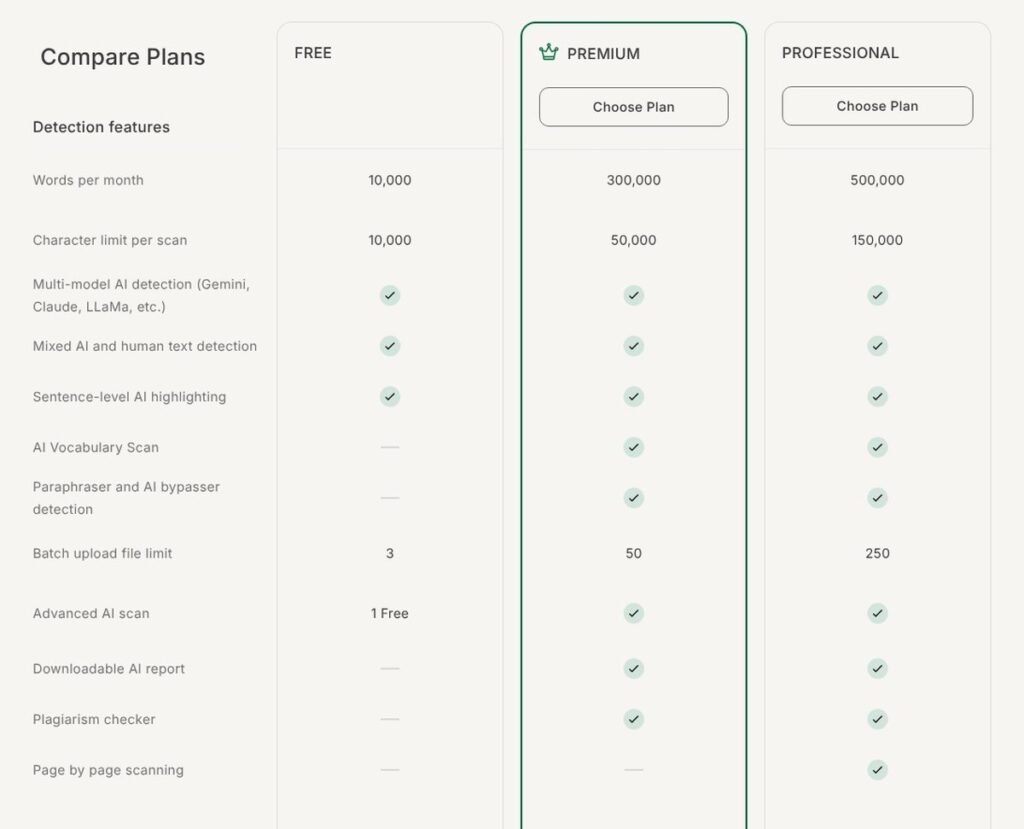
Essentially, GPTZero might still win for initial affordability, but Pangram probably offers better value for money in the long term.
Pangram vs GPTZero Accuracy: Which Would I Trust More?
This is probably the most important section here, because it doesn’t really matter how cheap or simple something is to use if you can’t trust it. There are actually quite a few studies that compare tools like Pangram and GPTZero based on accuracy benchmarks, but I don’t want to rely on those too heavily, since they tend to get outdated pretty quickly.
Still, they can give you a good starting point; this peer-reviewed study, for instance, gave Pangram a 65% strict accuracy score for fully AI-generated content, and a 92.5% score for hybrid writing, compared to a 0% for GPTZero. For humanized writing, Pangram got a 92.5% strict accuracy score compared to GPTZero’s 2.5%.
Still, that study used older versions of the detector, and a more recent piece of research from Epoch has shown that the two tools might be closer now, at least when it comes to detecting pure AI content (Pangram detected all 297 AI-generated passages, and GPTZero only missed two.)
False Positives and More Complicated Detection
Again, GPTZero is getting better at reducing its false-positive rate, although there’s less proof to refer to. Its own test from October 2025 showed it only produced one false positive among 10,402 student essays, but plenty of other reviews still say false positive rates can vary a lot depending on the type of content being scanned.
Pangram, on the other hand, has a relatively consistent false-positive rate of only 1 in 10,000, and its results have been backed up by quite an impressive number of third-party testers (including myself).
From the perspective of catching more complicated examples of AI in content (like seeing when a piece includes hybrid text, or paraphrased AI snippets), I think Pangram is a lot better.
GPTZero has a good reputation, and it’s becoming more accurate at targeting paraphrased and mixed writing as of 2026. Although I’ve found that Pangram tends to make fewer mistakes on that front, and the Epoch research I mentioned backs that up, finding that Pangram missed 10.1% of passages when AI was trained to imitate a real author’s writing style, compared to GPTZero’s score of 10.8%.
I will say both tools have their limitations, particularly with the standard stuff like heavily structured text, or very short snippets, but the same could be said for just about any AI checker at this point.
Pangram vs GPTZero: The Feature Showdown
It’s probably no surprise, but there’s quite a bit of overlap in what Pangram and GPTZero can do; they are both AI detection tools first and foremost, after all. Still, there are some pretty big differences.
AI Detection and Detailed Reporting
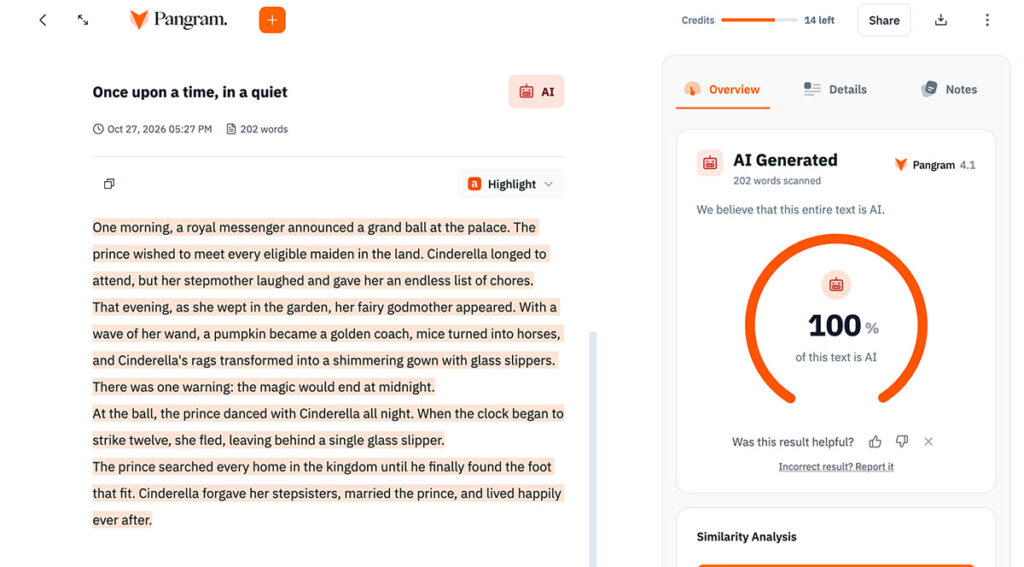
I’m quite a big fan of Pangram’s reporting, because it gives me genuinely useful insights into human-written, AI-assisted, and AI-generated passages without making my own analysis too complex. It can also show you when it thinks a portion of text has been paraphrased (after being produced by AI).
Pangram highlights individual sentences and sections, gives you confidence probabilities for each classification, and lets you download and share reports.
GPTZero has pretty great reporting tools, too, especially if you’re using the Advanced Scan tool to highlight suspicious sentences. There’s also a Masked Detection feature if you exclude certain bits of content from a scan (like a formatted table, for instance).
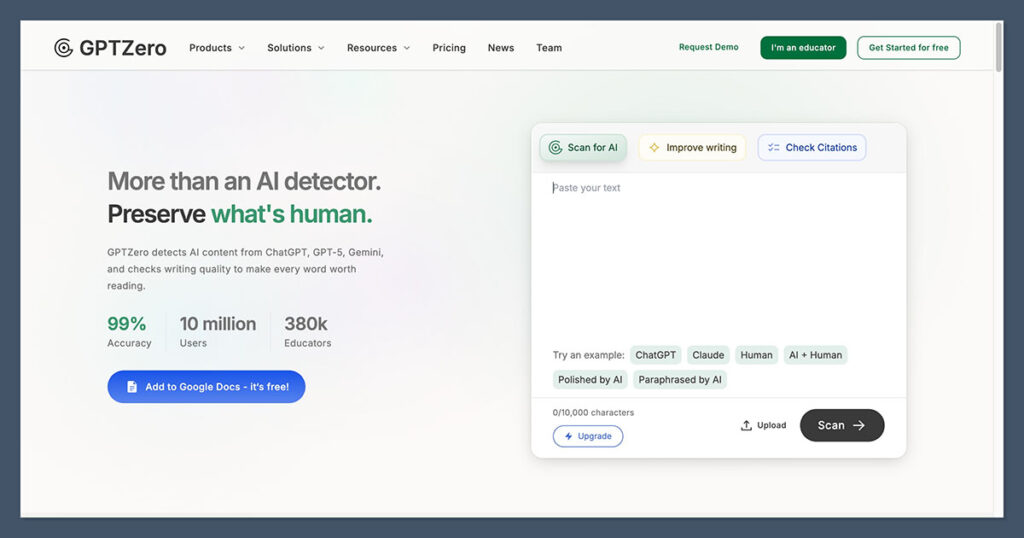
I also like the AI Patterns feature for an overview of the kind of recurring writing habits that usually get associated with LLMs, although it bothers me a little that GPTZero still concentrates quite a bit on perplexity and burstiness metrics to get a score. That feels a little outdated at this stage.
Writing Replay: If You Need More Evidence
I’m not one hundred percent in love with Writing Replay tools, because evidence that a person copied and pasted content from a word doc into another tool doesn’t also count as evidence that the text was AI generated. Still, it can be useful for gathering extra evidence.
GPTZero has its Google Docs writing report, and Writer Replay tools which you can use to record typing and activity on specific applications. Pangram offers something similar through its Google Docs integration, so you can see how a piece of text was developed.
If you’re going to be using either tool with a student, though, I’d probably let them know that in advance, so they can actually do the work in the right document.
AI Image Detection
Pangram obviously wins this category, even though Pangram Image is still in its early stages. The tool’s built on top of Meta’s DINOv3 computer vision model, so it can look for more than just basic AI watermarks in a visual, and even show heatmaps highlighting particularly suspicious parts of an image. It’s resilient against compression, and it works well with ChatGPT, Midjourney, and Gemini generated images based on my tests.
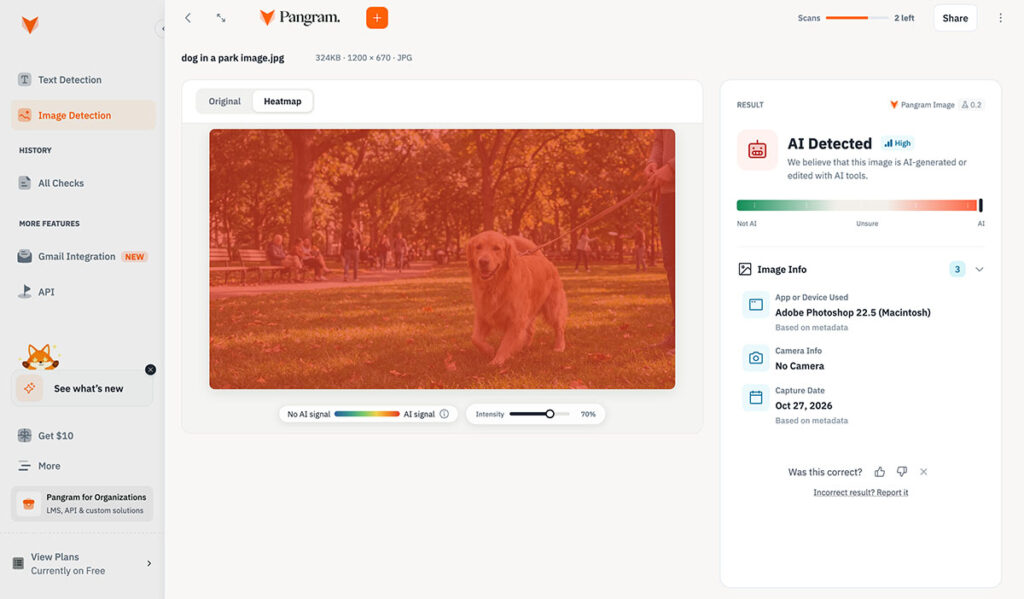
There are still limitations, of course, such as the fact that your images need to be at least 512 x 512 pixels, and the tool’s not designed for deep insights into deepfakes or face swaps. Still, since GPTZero doesn’t have an image detector at all, it can’t really compete. It can check written content as you browse websites with AI Vision and scan uploaded documents, but that’s it.
Plagiarism Detection and Writing Assistance
Pangram and GPTZero are pretty similar on the plagiarism front, both highlighting matching passages based on what they can find in their databases and online searches. Neither are full plagiarism detection tools, though, so if you’re really worried about that, I’d probably combine using one of these tools with something more specialist.
GPTZero does have a few more tools to explore if you need overall writing support, with a feedback tool that suggests clarity and grammar improvements. There’s also an AI vocabulary checker tool, and hallucination checker to help you examine the accuracy of citations.
Neither of these platforms offer tools to help people “humanize” AI text, either, which I actually think makes them a lot more trustworthy.
Languages, File Formats, and Accessibility
This is another close-call category. Pangram supports about 24 languages, compared to GPTZero’s 27, so both should be pretty decent for global teams or institutions. They also both handle different kinds of uploads, including PDFs, word documents, and RTF files. Plus, there’s OCR for scanned documents, although both can have some issues with heavily formatted material.
For basic overall accessibility (or ease of use), both are great for beginners too. With Pangram, you get a simple dashboard where you can paste text, upload a document, hit the “check” button and get results within seconds. You can even jump between different highlighted sections, and there’s a notes tool for recording anything you want to come back to.
GPTZero is just as approachable for new users. Paste or upload your content, run a scan, then dive into the results. Advanced Scan does give you more detailed explanations, and the extra writing tools are easy to access, although I will say that it’s a little frustrating to run a scan and then find out that you need a more expensive subscription for the next tool you want to use.
Pangram vs GPTZero Integrations and Everyday Workflows
Honestly, one of the main reasons I’ve kept recommending Pangram over the last few months is how effortless it is to use outside of the main dashboard. I use the Chrome extension pretty much every day to check text on websites, or take a closer look at the things I don’t trust on social media feeds.
There’s Google Docs and Gmail support too, plus connections for LMS tools like Canvas, Blackboard, Moodle, Google Classroom, and Brightspace. On top of that, you can also access the Pangram API, and use the MCP connection to let other compatible AI assistants help you out with your detection and similarity checks.
GPTZero is pretty well equipped on this front too, of course, with its own browser extension for Chrome, Edge and Firefox, plus an integration for Google Classroom and Canvas. You’ve also got an API option here, too, although no MCP connector that I can see at this stage.
Privacy and Security: Protecting Documents
Last but not least, both of these tools offer enterprise-grade data protection to companies that need it, though they do handle user submissions, storage, and training for future AI models a bit differently.
Both GPTZero and Pangram store submitted text in your account so you can return to results later, and both adhere to SOC 2 Type 2 compliance rules. They also both let you manually delete queries from your history.
For model training, though, Pangram explicitly states that it never uses your submissions to train models, and it never shares that content with third parties. GPTZero, on the other hand, does sometimes use submitted content (anonymized), to improve its tools. You can prevent GPTZero from doing that on an enterprise plan, but there aren’t as many controls for free users.
Pangram vs GPTZero: My Final Recommendation
Ultimately, Pangram is still my favorite, even if I have to admit that GPTZero is a lot better than it used to be. I still like GPTZero, particularly for people who want an affordable way to check documents for AI, and a bit of extra writing assistance.
Still, Pangram is the tool that I think handles paraphrased and humanized content best; it’s also the one I trust more to avoid high false-positive scores. Plus, the extra features, like Pangram Image, make the whole package a lot more appealing.
There’s nothing to stop you from using both, of course (I still do), but I’d still start with Pangram if you want a result you can trust to help you take the right next step.